In this article, you will learn how to an enter a lost and found item on both the desktop and mobile.
How to Enter a Lost & Found Item from the Desktop
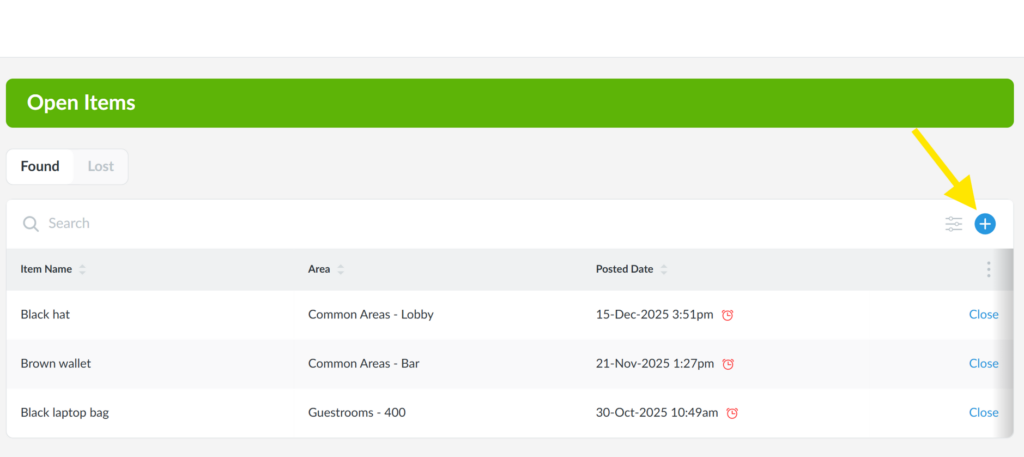
1. From the desktop Lost & Found app, click the + icon to the right of the Search bar.
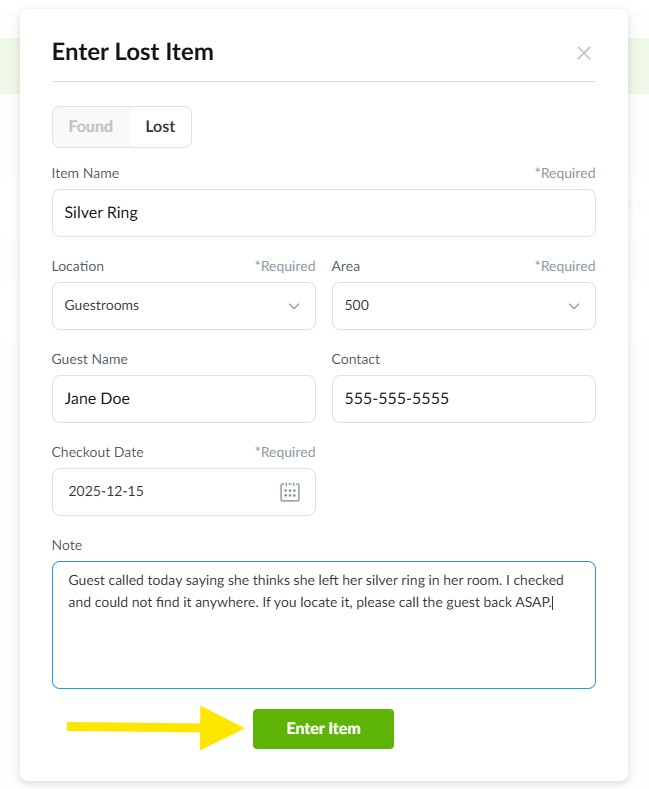
2. Select whether it is a Found or Lost item, then enter in all other fields. Enter in additional notes and click the green Enter Item button to post.
Pro Tip: For Found items, you will have the option to upload a photo.
How to Enter a Lost & Found Item on Mobile
1. From the mobile Lost & Found app, tap on the + icon in the upper-right corner of your screen.
2. Select whether it is a Found or Lost item, then enter in all other fields. Enter in additional notes and click the blue Enter Item button to post.
Pro Tip: For Found items, you will have the option to upload a photo.
3. After tapping Enter Item, the item will appear on the Open Items page of the Lost & Found app.