You can track completed PMs from the desktop using both the PMs app and the Reports app.
Use the desktop PMs app to view detailed information, such as all line items, for all PM types. Use the Reports app to view at-a-glance information regarding guestroom PMs.
In this article, you will learn how to track PM records from the desktop.
How to View PM Records in the PMs App
1. From the PMs Overview page, click the numbers in the PM column for the desired timeframe. If you see a green checkmark, this means the PMs are complete for that timeframe. If you see a red exclamation point, this means there is missing inventory for that PM template. Watch this video for instructions on how to add assets to the Inventory app.
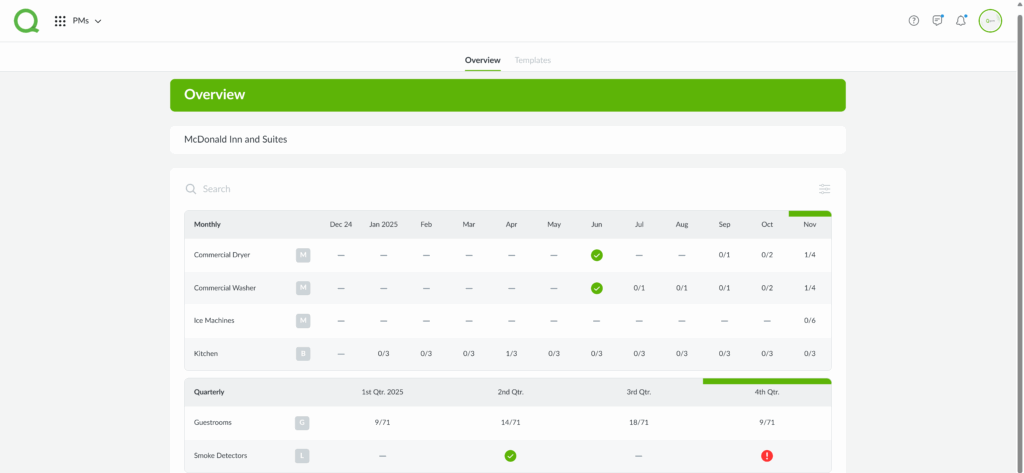
2. Use the Search field to search PM by keyword. Use the Filters button (button with three lines) to sort by completion date.
3. For Guestroom PMs, you will see a rooms grid, offering visibility into each room’s maintenance status. Click on any room number to learn more. Scroll below the rooms grid to view guestroom statistics.
4. PMs shown in dark green are completed for that period, and PMs shown in a lighter green are currently in progress or paused.
Note: The PM Overview page shows the last 12 months of records, while the Reports app lets you access older records.
How to View PM Reports in the Reports App
The Reports app offers four PM reports: Completed PMs, PM Frequency Rollup, PM Item Detail, and the PM Summary report. To access these reports, log in to the desktop and click Reports from the App Switcher. Once in Reports, click Preventative Maintenance from the Library page, then on the report you wish to view.
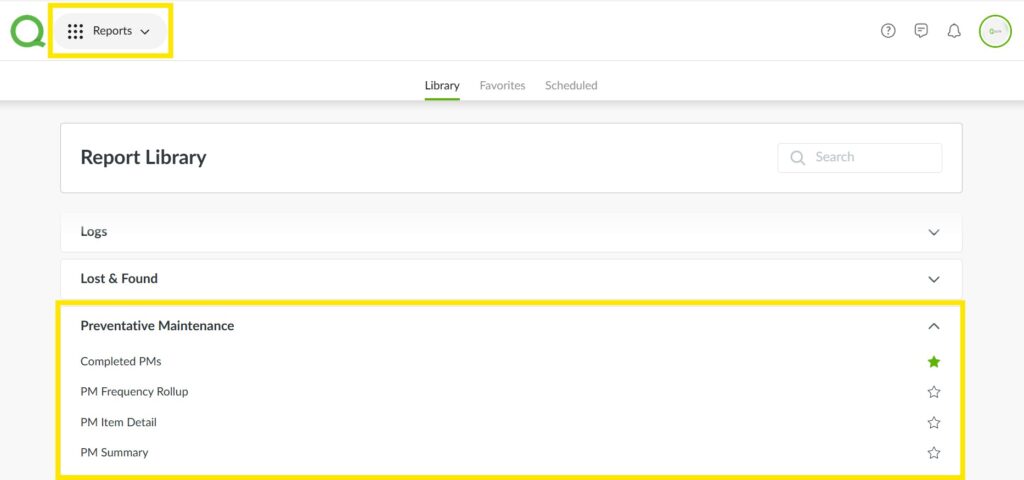
To run a report, click the report’s name, then filter each field based on the information you want to view. When you’re finished click Run Report.
If you would like to receive a report regularly, click Schedule Report to set up automatic email delivery.
Pro Tip: Click the star icon next to a report to add it to your Favorites, located at the top of the Reports app.