In this article, you will learn how to create a message in the Mail app.
SECTIONS:
How to Create Messages (Desktop)
How to Create Messages (Mobile)
How to Create Messages (Desktop)
1. From the desktop Mail app, click the blue + icon.
2. Select whether you are sending a Message or Memo.
Note: Memo creation permissions are limited to corporate, regional, and management users.
3. Enter the recipient(s), subject, and message, then click Send.
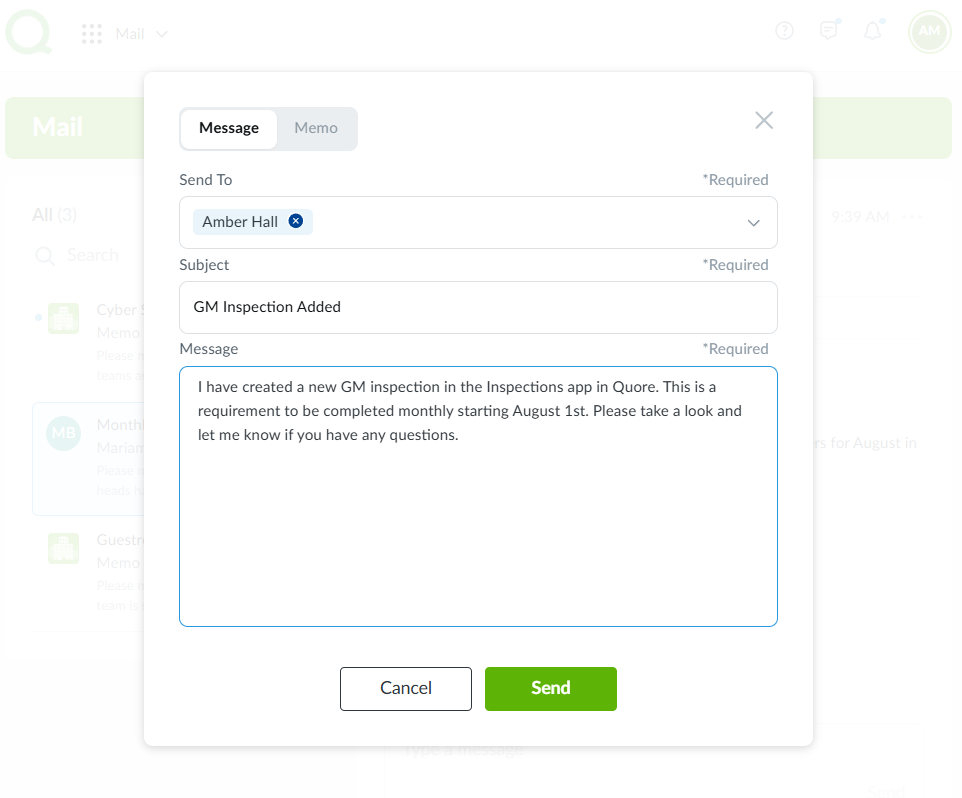
4. After you click Send, the message will appear in both your Quore inbox and the recipient’s Quore inbox. Recipients will also receive an email if they have an email address saved in their Quore account settings.
Note: If they are logged into the Quore mobile app and marked On Duty, they’ll receive a push notification when a new message is sent to them.
How to Create Messages (Mobile)
1. From the mobile Mail app, tap the + icon in the top-right corner of your screen.
2. Select whether you are sending a Message or Memo.
Note: Memo creation permissions are limited to corporate, regional, and management users.
3. Enter the recipient(s), subject, and message, then select Send Message.
4. After you select Send Message, the message will appear in both your Quore inbox and the recipient’s Quore inbox. Recipients will also receive an email if they have an email address saved in their Quore account settings.