In this article, you will learn how to reply to messages using the desktop and mobile versions of the Mail app.
SECTIONS:
How to Reply to Messages (Desktop)
How to Reply to Messages (Mobile)
How to Reply to Messages (Desktop)
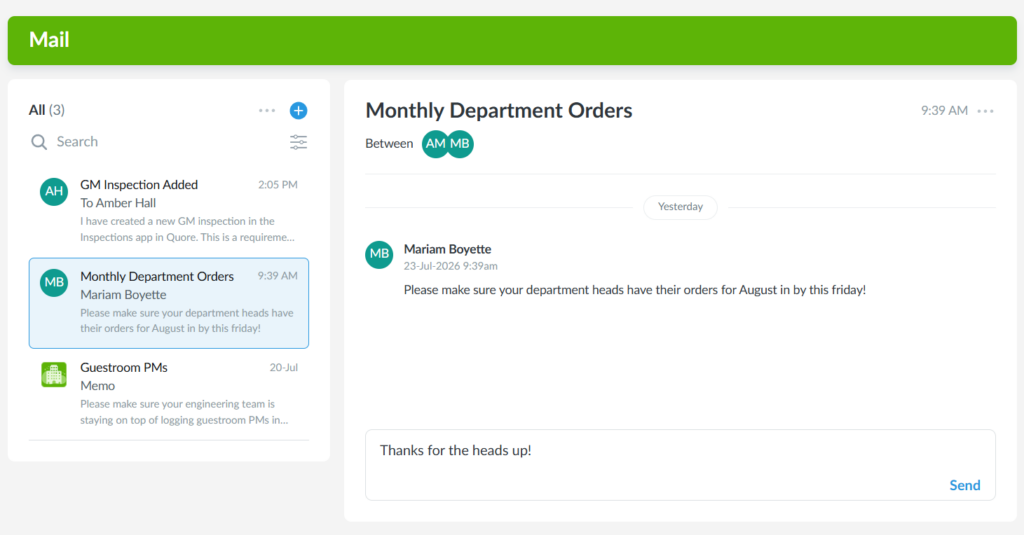
1. From the desktop Mail app, select the message you want to view.
Note: Unread messsages and memos will be marked with a blue dot.
2. To reply, enter your message in the Type a message field within the conversation. Keep in mind that only messages can be replied to; memos are read-only.
3. When you’re finished, click Send.
Pro Tip: Sent a reply and need to make a change? Select the three-dot icon next to your reply to edit or delete it from the desktop.
1. From the mobile Mail app, select the message you want to view.
Note: Unread messsages and memos will be marked with a blue dot.
2. To reply, enter your message in the Type a message field within the conversation. Keep in mind that only messages can be replied to; memos are read-only.
3. When you’re finished, tap Send.